 Overview
Global Pharmaceutical Company - A Master Data Product
Redesigning a Fragmented Legacy Workflow into a Unified, Role-Based Governance Platform
MY ROLE
UX Designer, UX Architect & a Close Ally to Design Lead
DURATION
5 months
TEAM
Design Lead, UX Designer (me), Engineering, Product stakeholders
SCOPE
Request workflow module — end-to-end: research synthesis, IA, Interaction design, Usability testing
01 Ownership
My Ownership

02 The Context
The problem worth solving
A global pharmaceutical company was consolidating multiple disconnected data management platforms into a single unified system. The migration wasn't just technical — it forced a reckoning with years of process fragmentation.
The cost of this fragmentation wasn't abstract. Every delayed approval meant delayed data governance. Every missed notification meant a manual follow-up. Every context switch meant time lost for people whose jobs already demanded precision.
Current(As-Is)
Platform
Multiple disconnected data systems
Workflow Structure
Domain Specific structure
Data Quality
Duplication & Overlaps
Future(To-be)
Platform
Unified, Integrated data platform
Workflow Structure
Seamless cross-domain flows
Data Quality
Fair, governed data
03 The Approach
01
Understanding user needs
Survey & Interviewing stakeholders to understand their problems with existing system
02
Defining key user challenges
Collaborate with product and technical team to define features and functionalities
Visually aligning the product with user needs
03
Implementation & evaluation
Conduct usability testing with a diverse user group.
Iterate on design based on user feedback, focusing on user needs and preferences.
04 EMPATHIZE
Understanding the Problem - 2 research lenses
Quantitative Research - Survey
To understand what wasn't working across the legacy MDM systems, we ran a broad survey. Over 500 users responded. I participated as an active observer and analyst of the data. I processed them through affinity mapping to find recurring patterns.
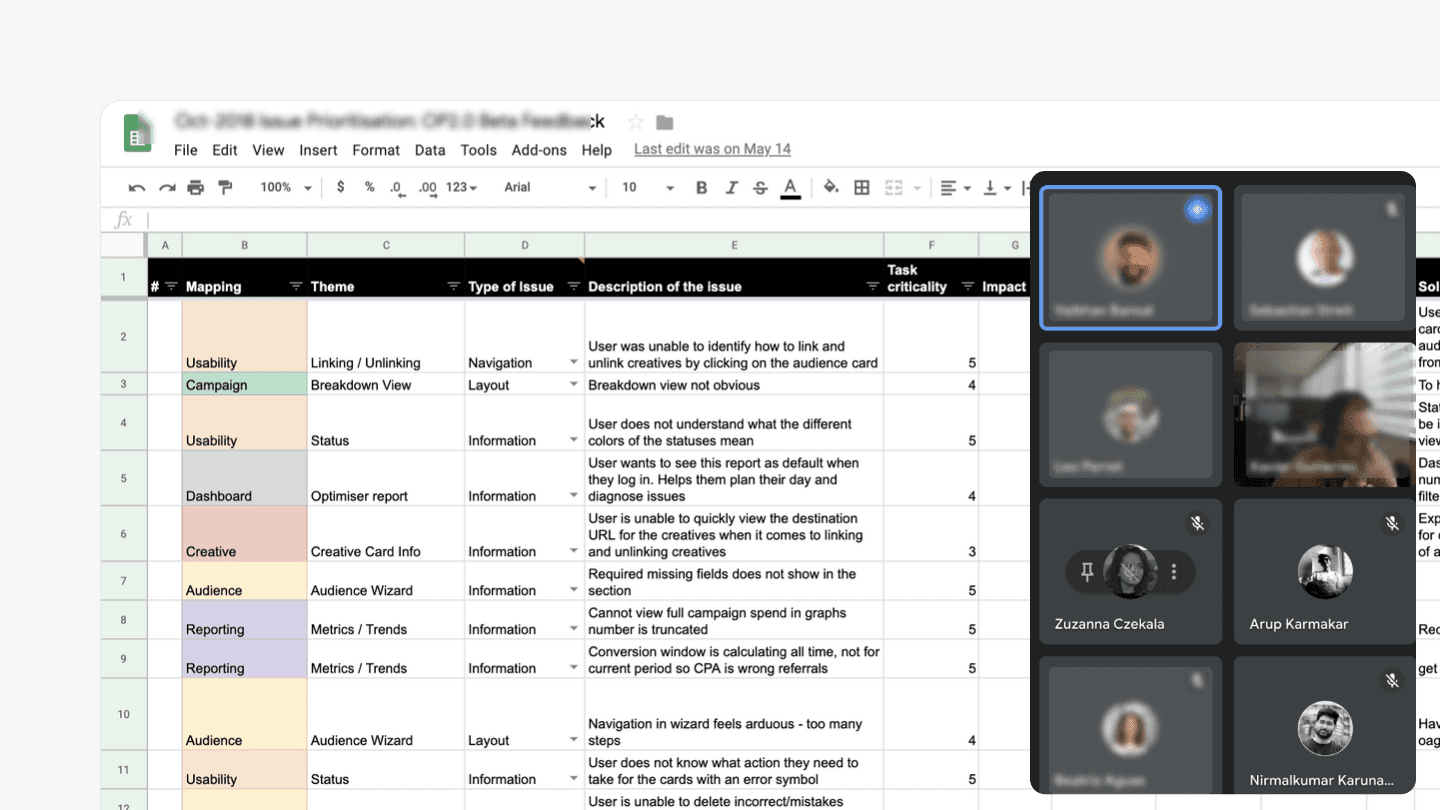
Survey
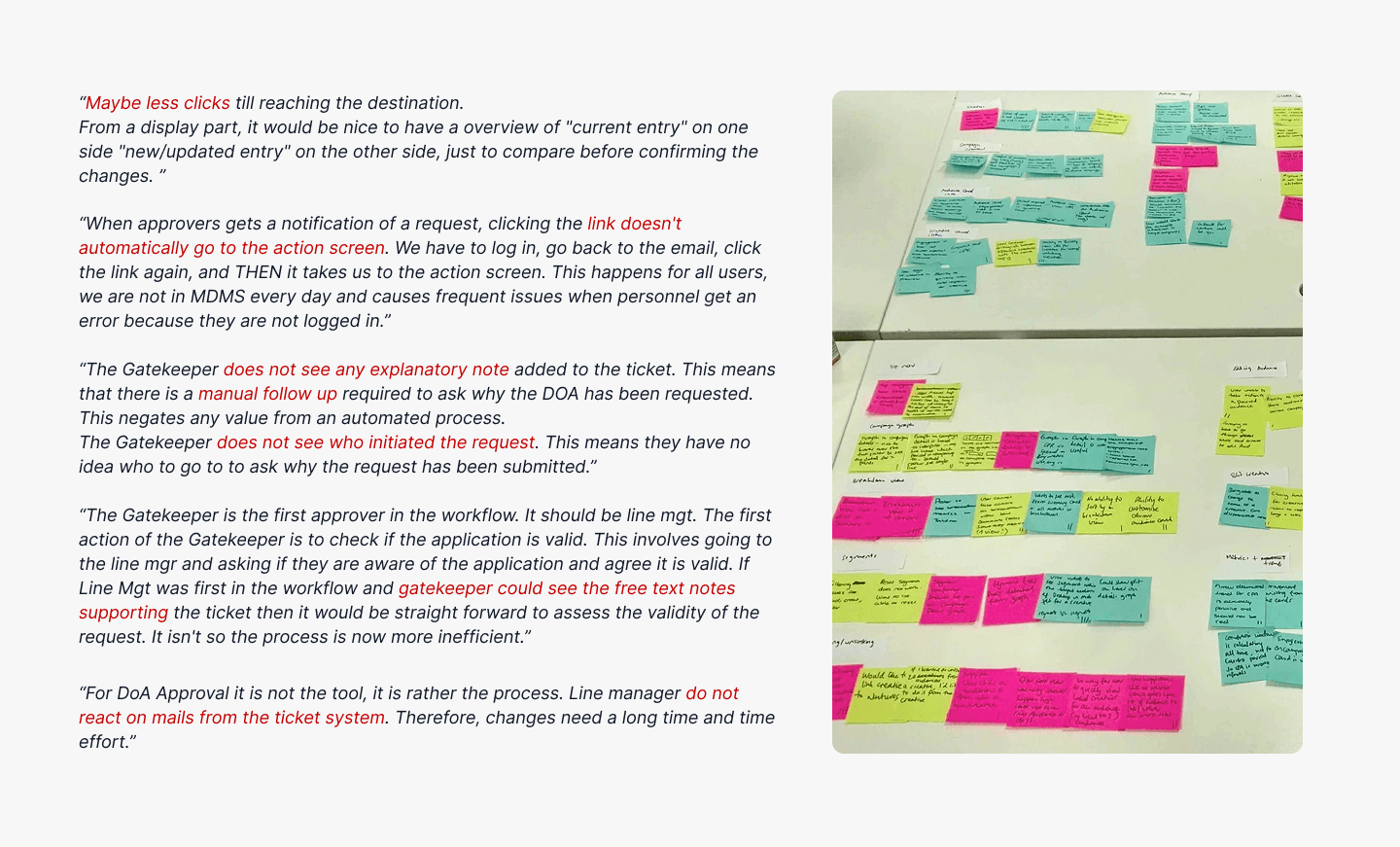
Affinity Mapping
Their analysis clustered into five distinct areas.
Search & Filtering Issues
Users struggled to find the right data due to complex filters, inconsistent search behavior, and unclear terminology
Workflow & Approval Friction
Approval processes lacked transparency, context, and automation, causing delays and manual follow-ups
Performance & Access Pain
Slow system performance, repeated logins, and VPN dependency impacted daily productivity
Reporting Challenges
Users relied heavily on reports but faced limitations in customization, consistency, and reusability
Usability & Learnability Gaps
Many users found the system hard to understand, especially infrequent users, due to lack of guidance and clarity
This case study focuses on Workflow & Approval Friction — the cluster with the highest operational impact and the most actionable design surface.
Heuristic evaluation - System Audit
In parallel with the survey synthesis, we conducted a heuristic evaluation of the existing system.
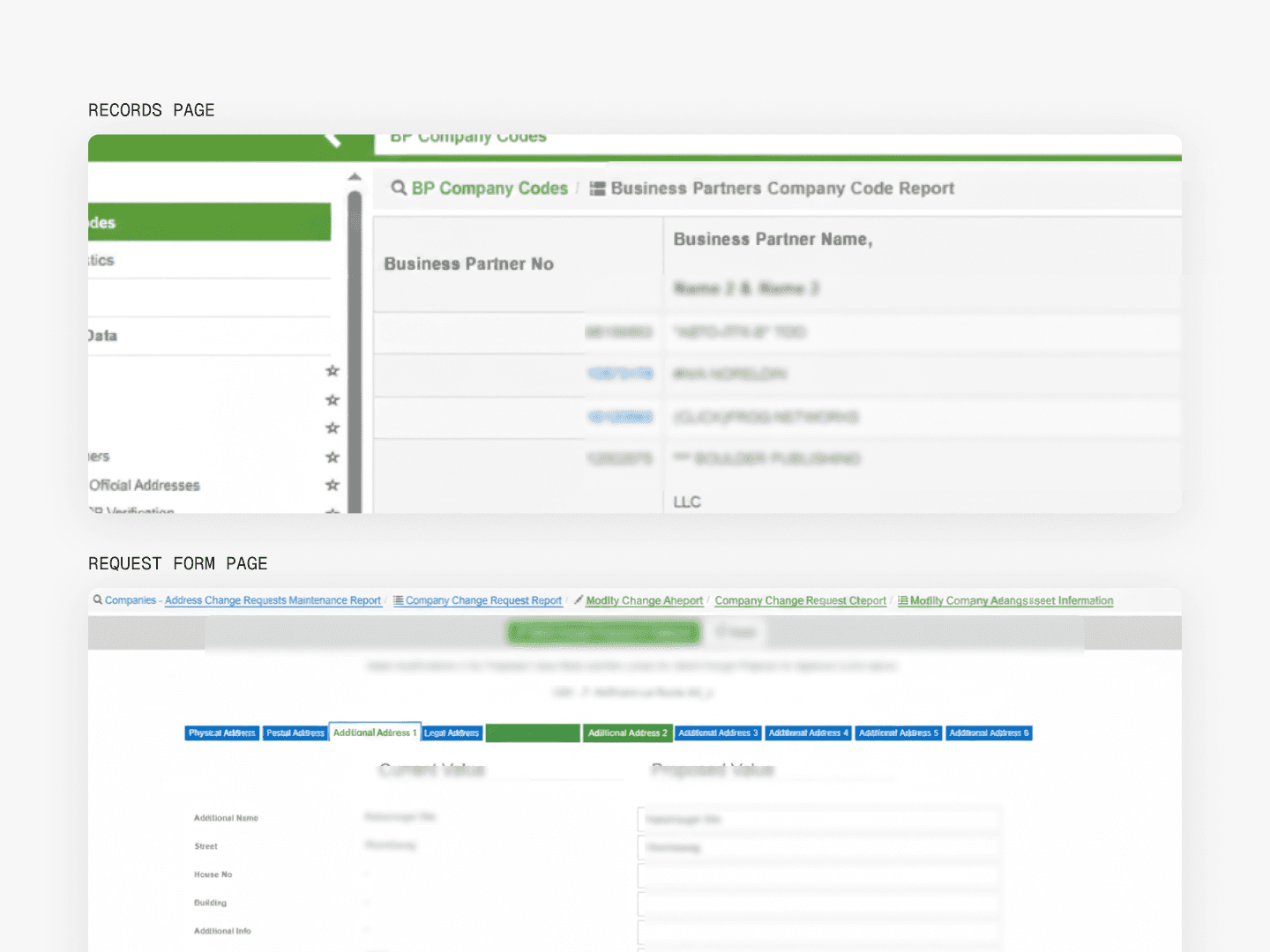
In parallel with the survey synthesis, we conducted a heuristic evaluation of the existing system.
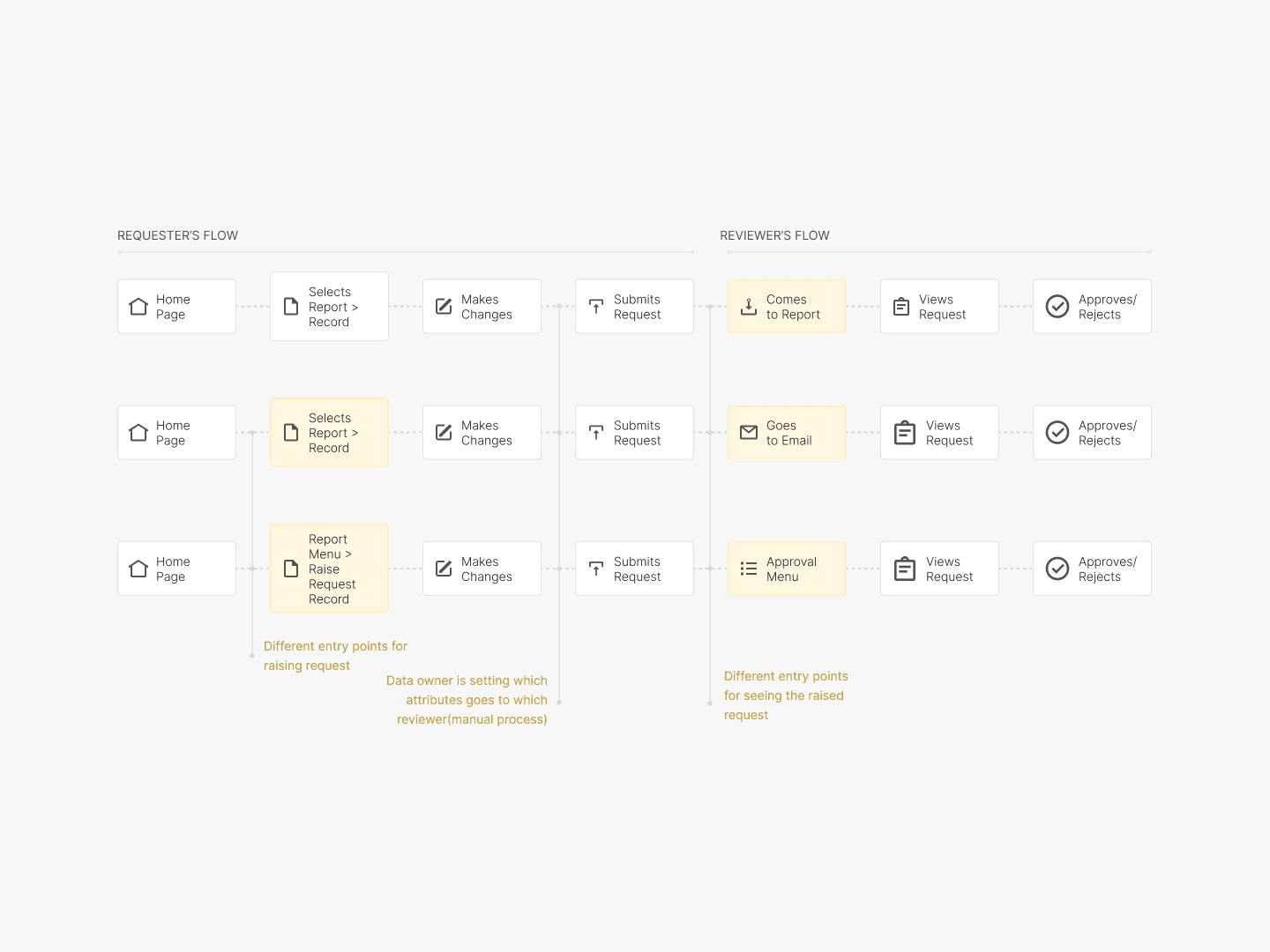
A request in the legacy system had three role-based flows: Requester (raises and views), Reviewer (approves or rejects), and Administrator (configures routing rules). We mapped the as-is journeys for each.
4 structural problems emerged.
Context Switching - Fragmented journey
Users were redirected to external or separate interfaces during request creation, breaking the flow and making it difficult to maintain task context
Users struggled to find where to initiate a change request. The starting point wasn't clearly surfaced, leading to wasted time before any meaningful work began.
Once a request was submitted, users had no clear guidance on next steps, no status visibility, and no way to track progress without chasing people externally.
Manual, non-intuitive routing configuration.
The process for setting up who reviews what — the entire governance layer — required manual entry across disconnected systems, with no confirmation that the setup was correct.
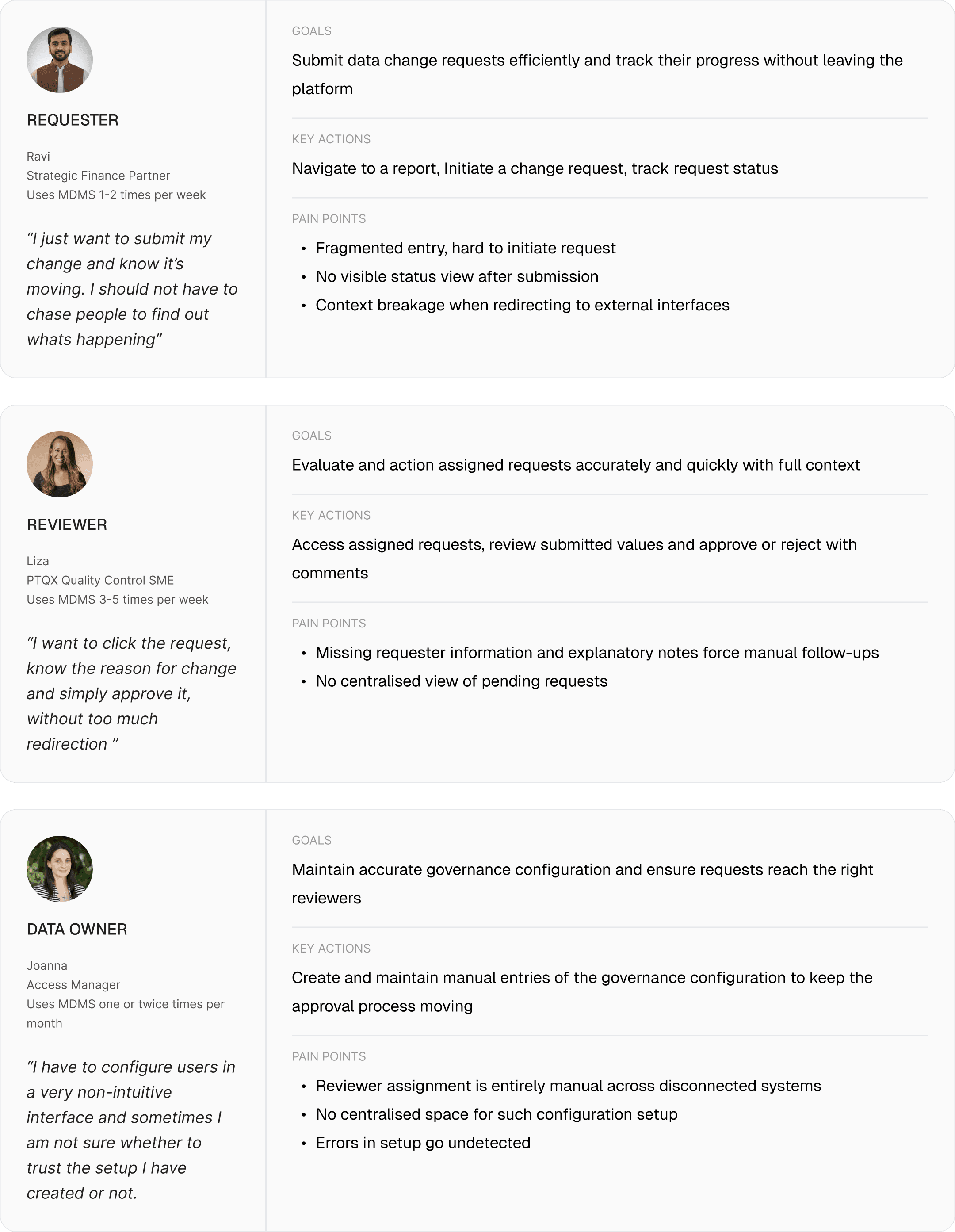
06 The Users
Three Distinct Goals, Three Distinct Frustrations
Our research gave us three well-defined user archetypes, each with different frequency of use and different stakes.
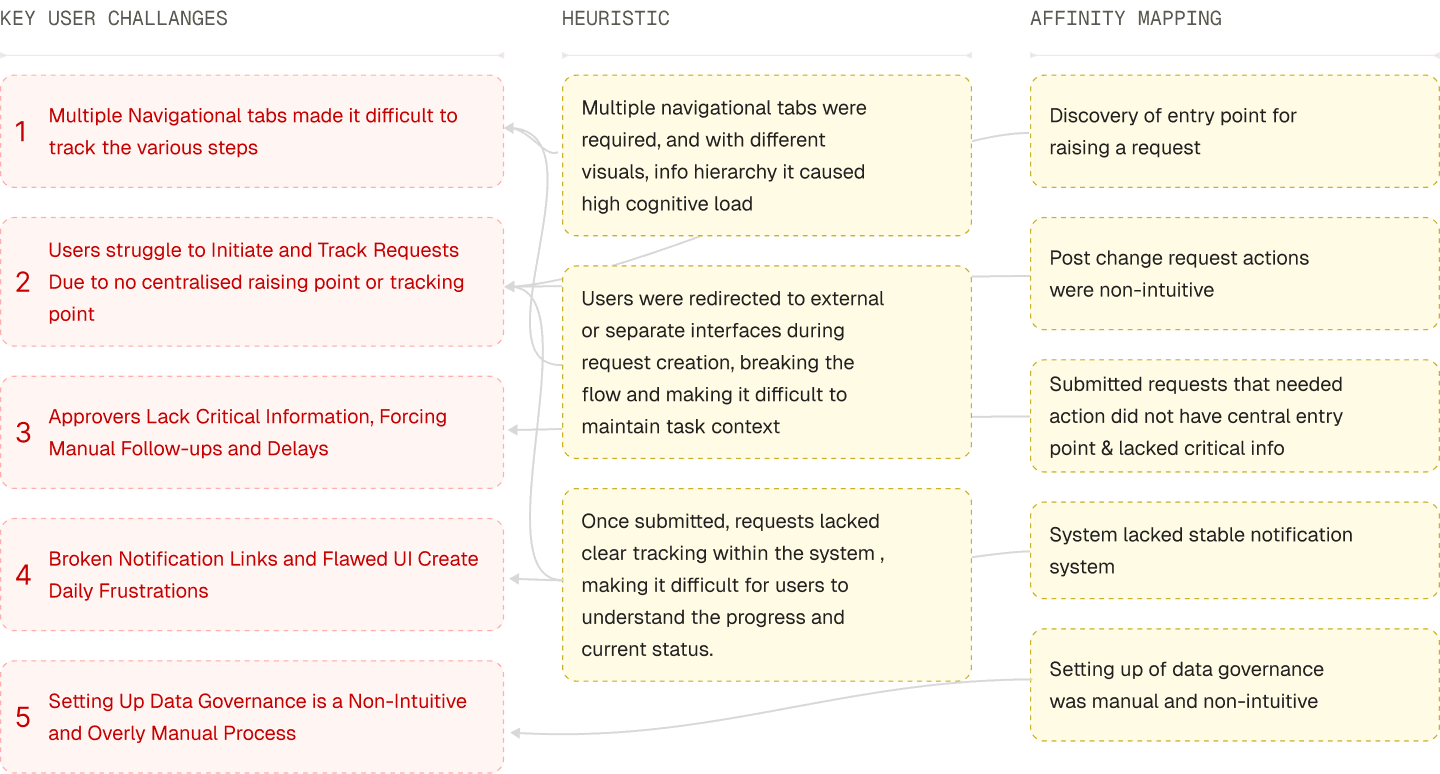
07 Key USer Challenges
Synthesising Challenges Across Lenses
Synthesising Challenges Across Lenses
Bringing together the survey data, heuristic findings, and journey mapping, five key user challenges emerged. Each was validated across multiple research inputs.
08 Define
The Problem Statement
How might we redesign the fragmented request management workflow to enable users to raise, review, and configure data change requests efficiently within a single unified platform?
09 Phasing
Phasing the Solution
With five challenges identified, stakeholder alignment was needed on sequencing. Working with the team, we mapped challenges against user impact and development feasibility. My input was to advocate for prioritising the Requester and Reviewer flows first — they had the highest daily user frequency and the most visible breakpoints.
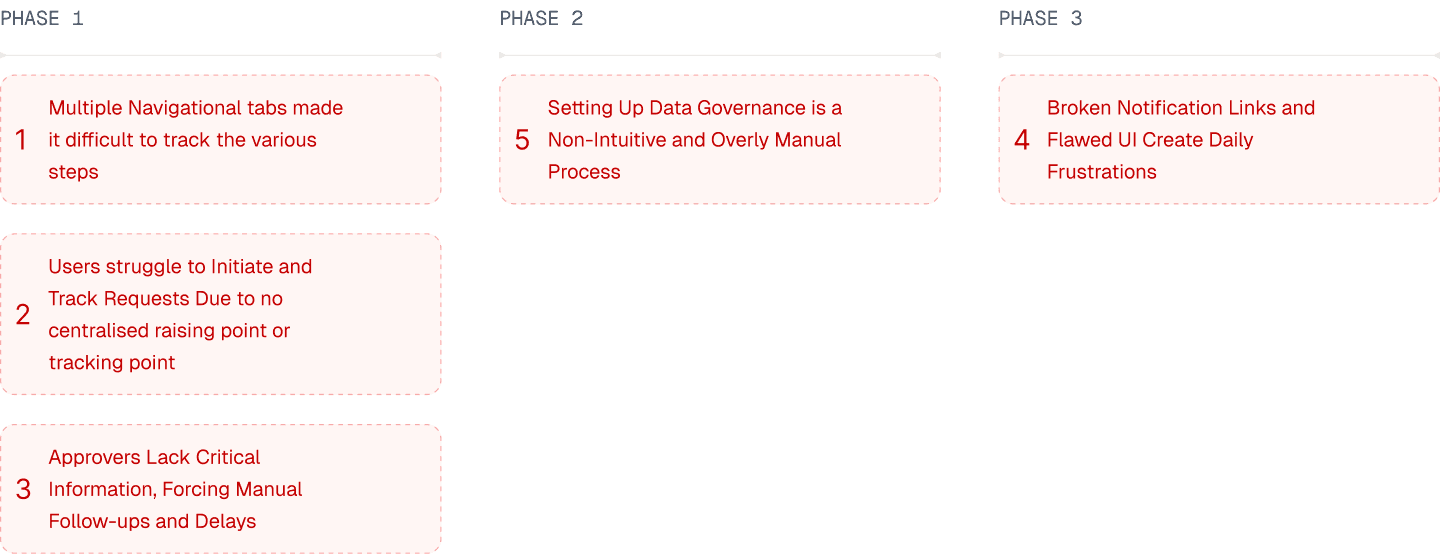
Phase 1 scope (this case study): Centralised request initiation, standardised submission form, request tracking visibility, and approval routing configuration.
10 Updating user flow
The Base Challenge: Three Flows, One Platform
Before designing any screens, we remapped the ideal journeys for each user type. The key shifts:
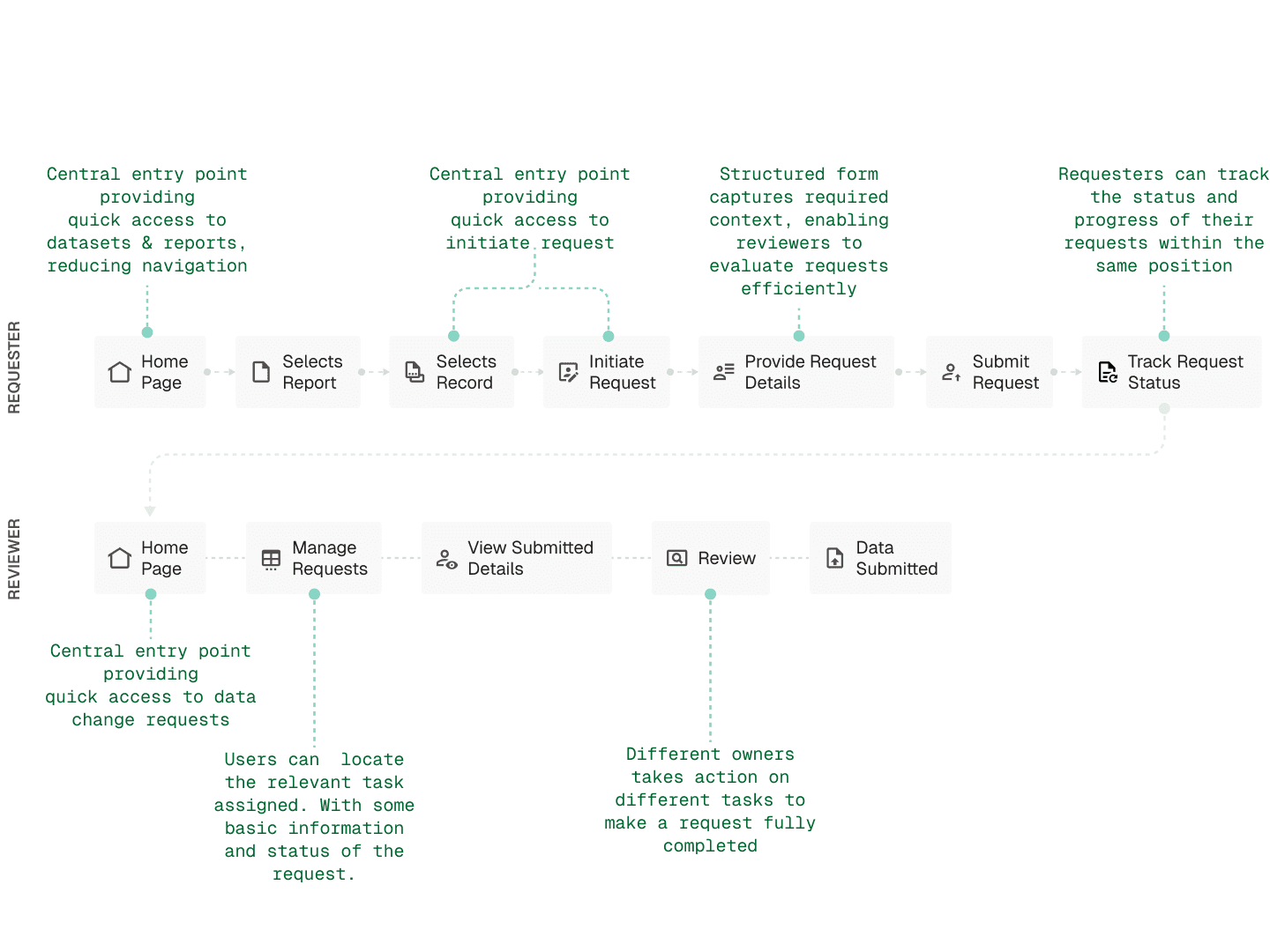
3 Key Improvements
Integrated request initiation within the data view
Now a request submission always follows a process where in, they need to go to a record and Initiate change with the help of well defined Insert/Update Record button.
Standardised request submission
We decided that it was best to standardised the submission form.
Improved request visibility and tracking
Raised request were needed to be made visible for both requester and approver.
11 Solution
Challenge 1 — Standardising Request Initiation (Requester Flow)
Previously, users encountered multiple inconsistent entry points to raise a request — different menus, different labels, different starting contexts depending on where they were in the system. We replaced this with a single, consistent pattern: navigate to a dataset, select a record, and initiate the change via a clearly labelled Add / Update Record action in a contextual menu.
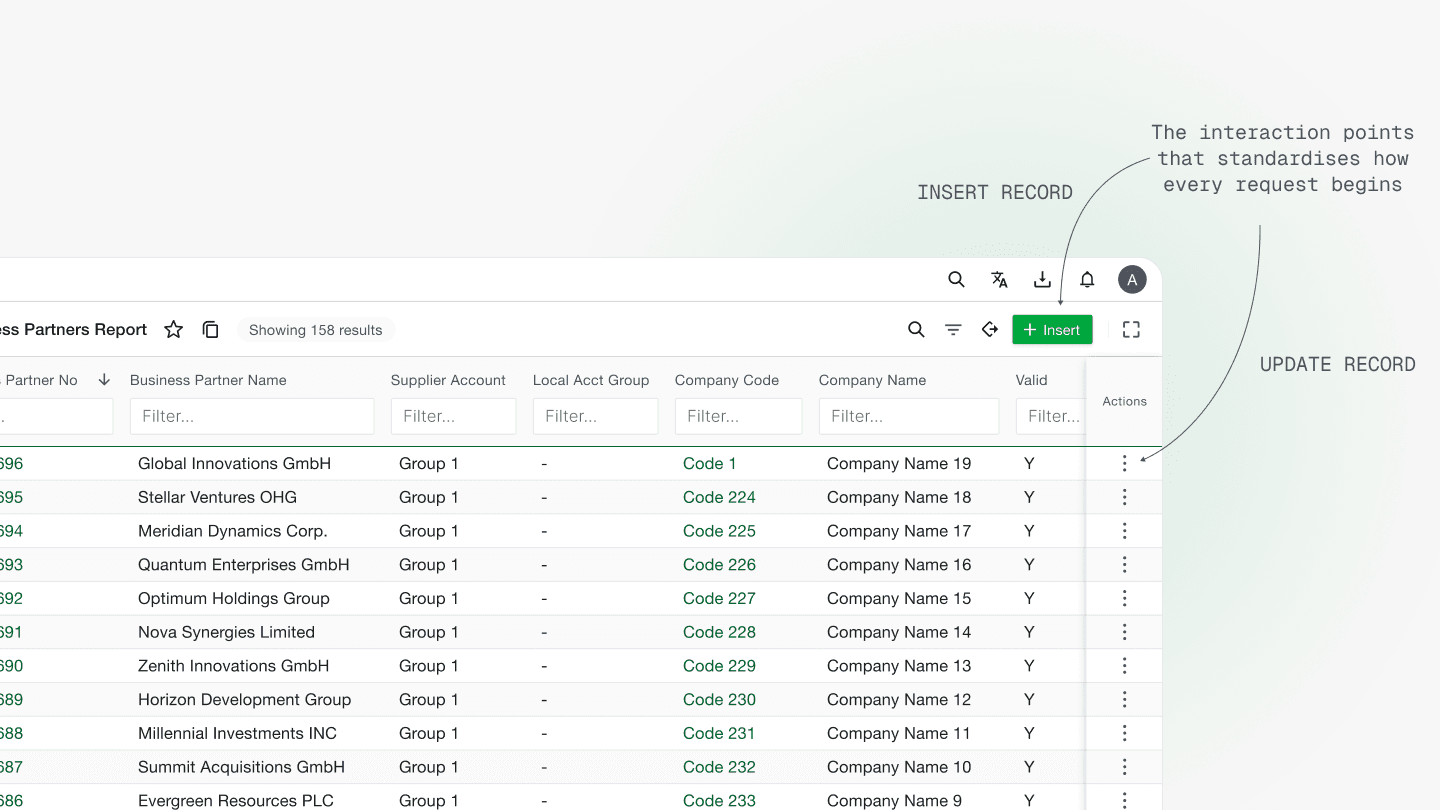
Key design decisions and rationale
A primary button of Inserting record on the report's page within the area reserved for primary actions. Update record - being a record specific action kept in a sticky column, accessible even with long horizontal scroll.
Challenge 2 — Standardising the Request Submission Form
The submission form was one of the most critical design decisions in the entire module. Requesters were previously met with different UI structures depending on which record they were editing, making each submission feel unfamiliar and requiring re-orientation every time.
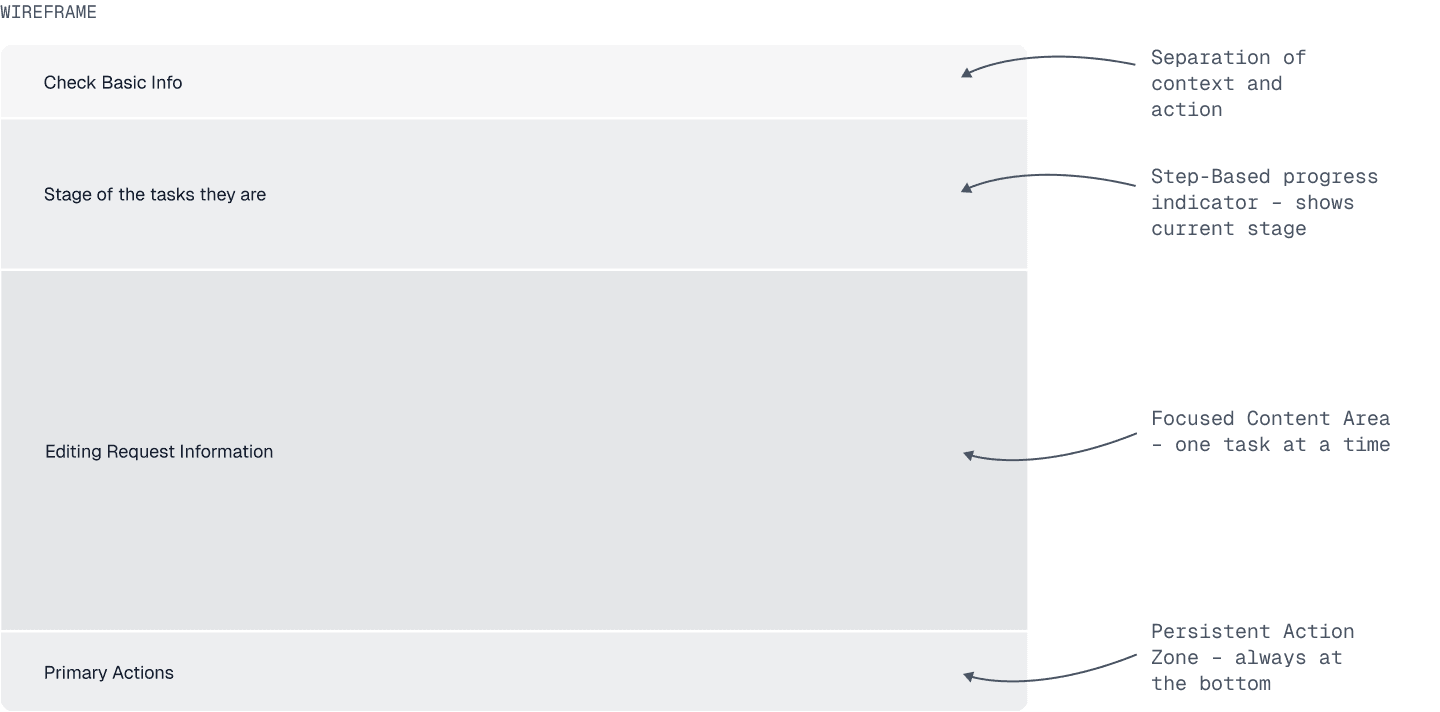
Our Approach: We identified four categories of information required for every request — basic context, field values, supporting detail, and primary actions — and structured the form around these consistently, every time, regardless of record type.
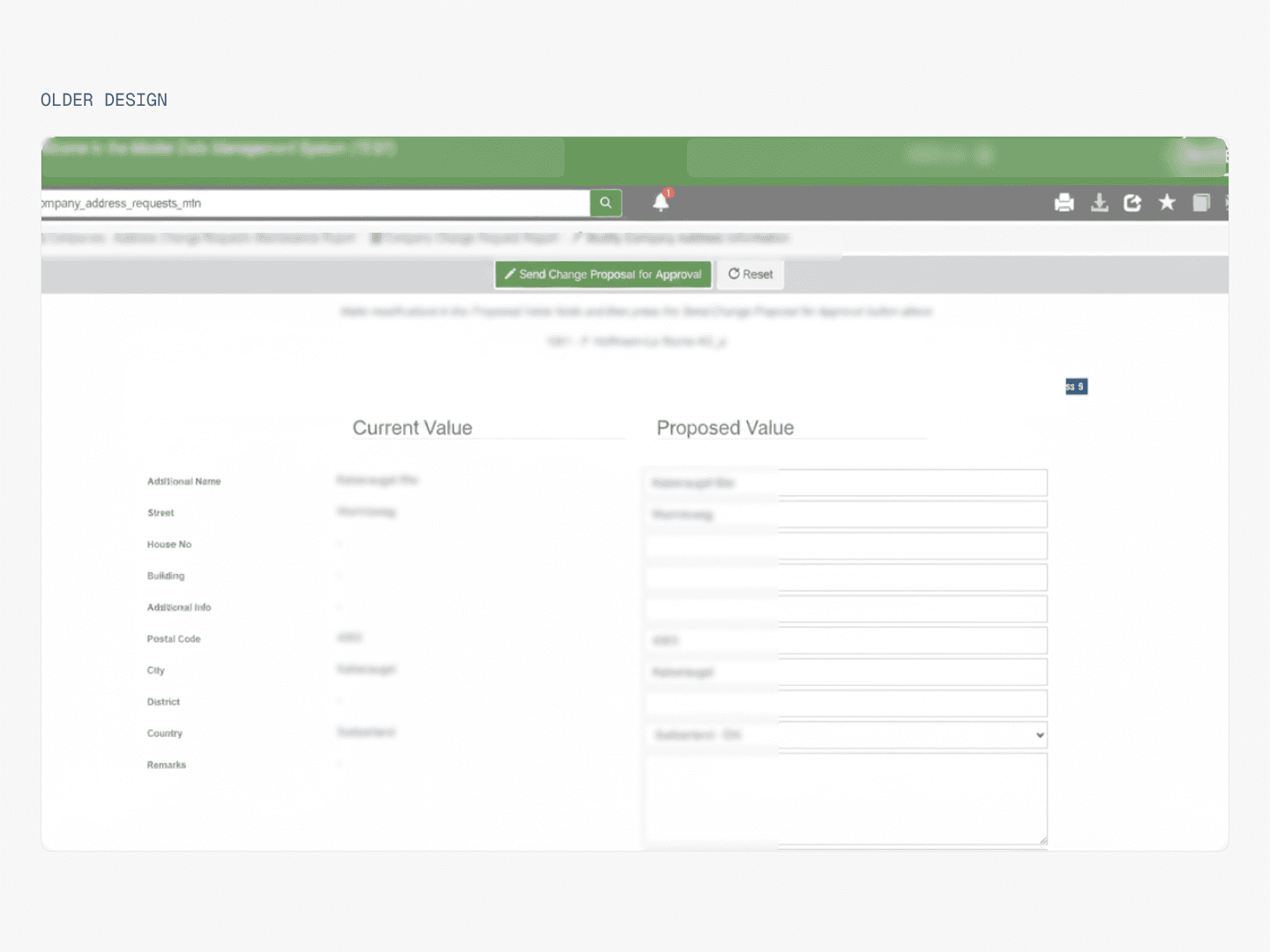
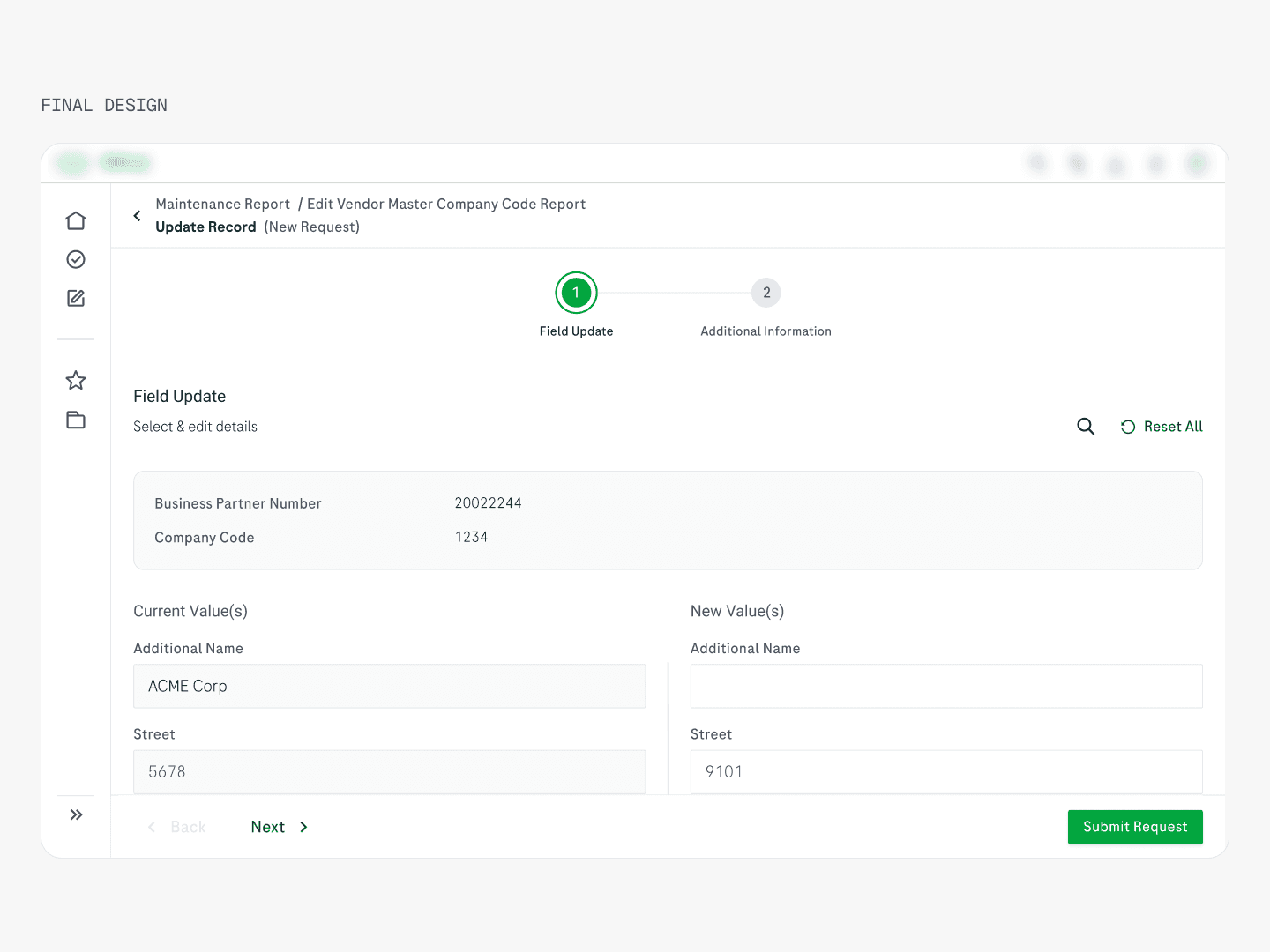
Key design decisions and rationale
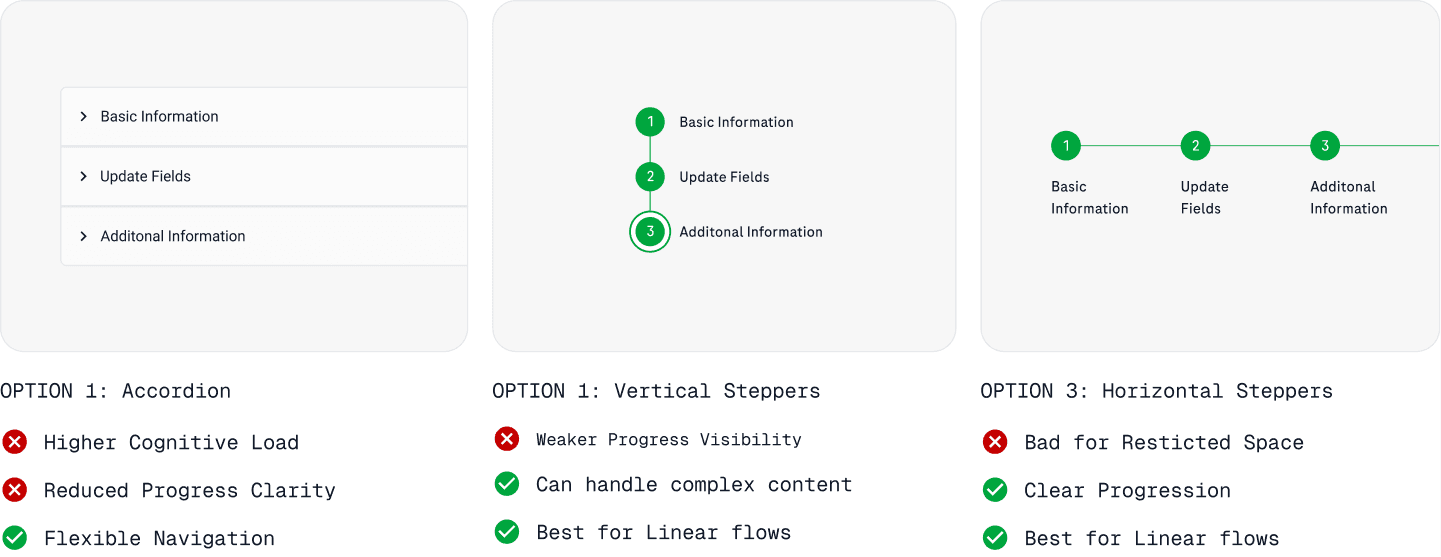
Horizontal stepper over vertical or accordion. Progress visibility was the core need for a multi-step form. Users had no sense of where they were in the submission process. A horizontal stepper makes stage and progress immediately scannable. A vertical stepper can handle more complex content but weakens progress clarity; an accordion introduces higher cognitive load and removes sequential guidance entirely.
Fixed context / content / action zones. The form is divided into three persistent areas: a header zone for basic identifiers (always visible), a central editing zone (one task at a time), and a bottom action zone (always in the same position). This directly resolved the disorientation users felt when switching between different record types — the layout never changed, only the content within it.
Current vs. new value comparison. This came directly from the research — users wanted to see what they were changing against what existed. The side-by-side layout in the editing zone makes this comparison immediate and removes the need to switch views or open separate screens.
Challenge 2 (continued) — Tracking the Request
After submission, the legacy system offered no visibility. Requesters simply waited, with no way to know where their request was without contacting someone externally.
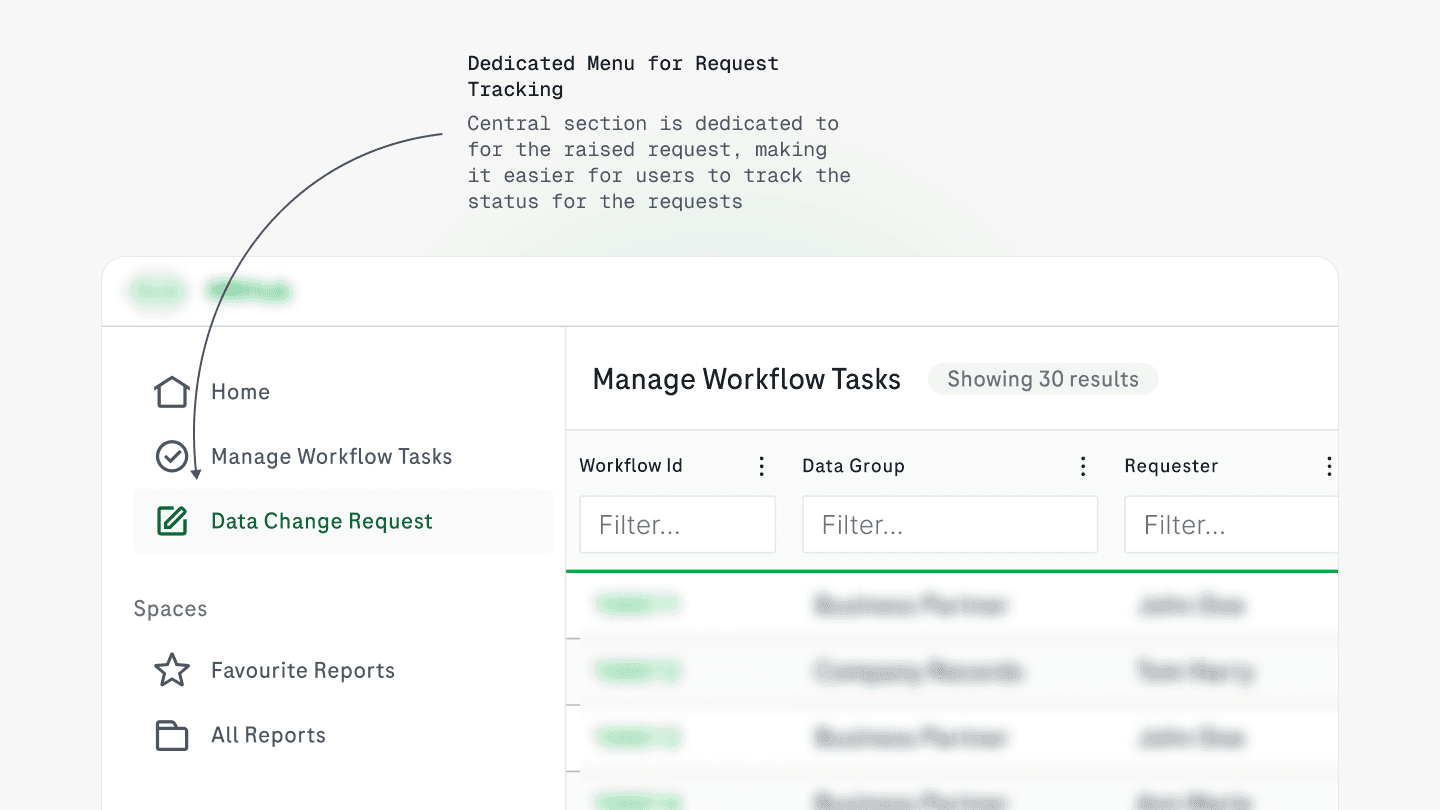
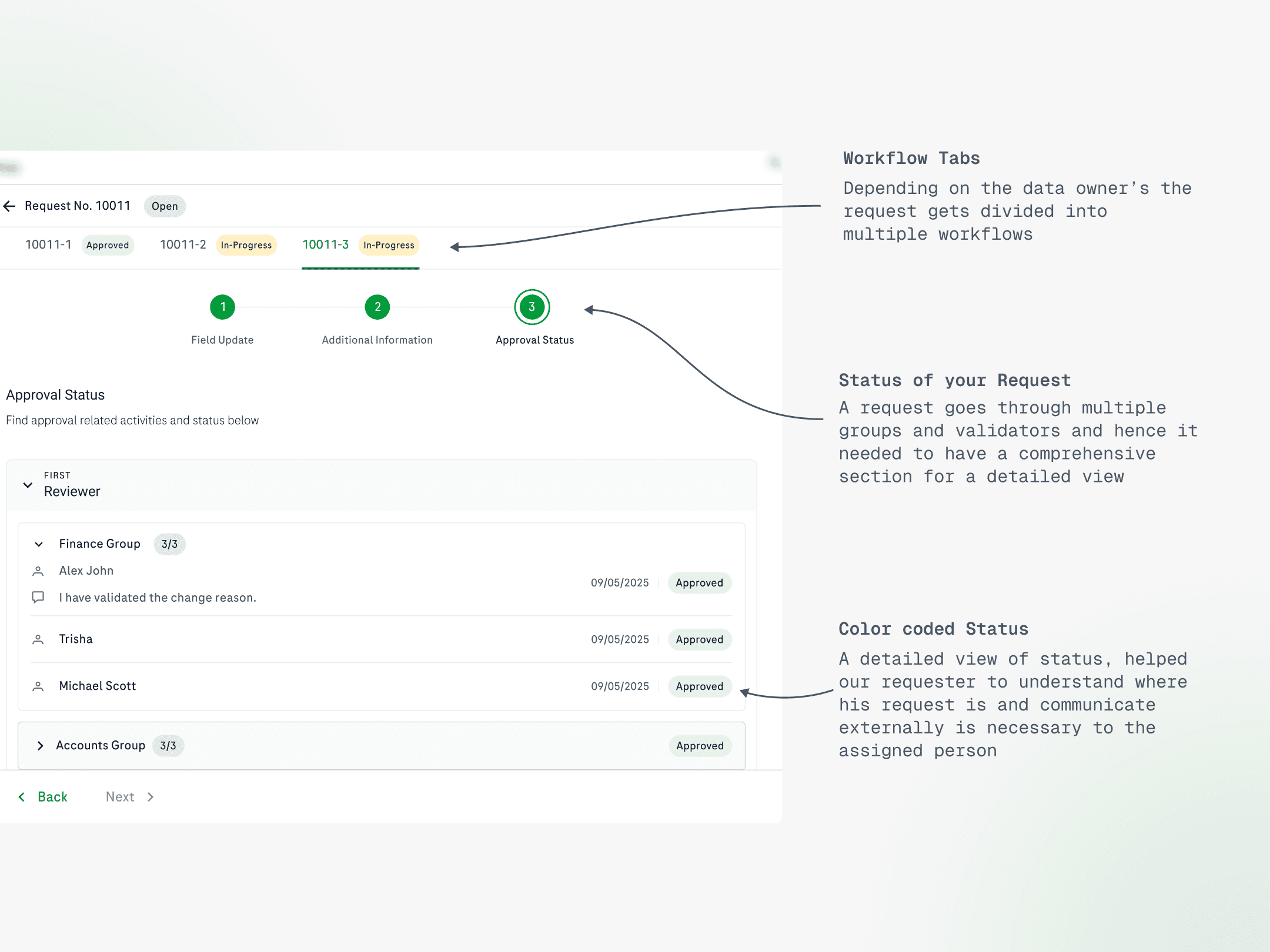
A dedicated My Requests section in the sidebar now gives requesters a centralised home for all submitted requests — colour-coded status (In Progress / Approved / Rejected), a detailed approval status view showing each stage and assigned reviewer, and a withdraw option if needed.
Key design decisions and rationale
The steppers in the tracking view intentionally mirror those in the submission form. This was a deliberate consistency decision — by the time a user checks on their request, the stepper language is already familiar. No new pattern to learn; reduced cognitive load throughout.
Challenge 3 — Giving Reviewers the Context They Need
Reviewers in the legacy system received notifications that didn't deep-link correctly, had no visibility of who submitted the request, and couldn't see any supporting reasoning. It made every review a manual investigation before any action could be taken.
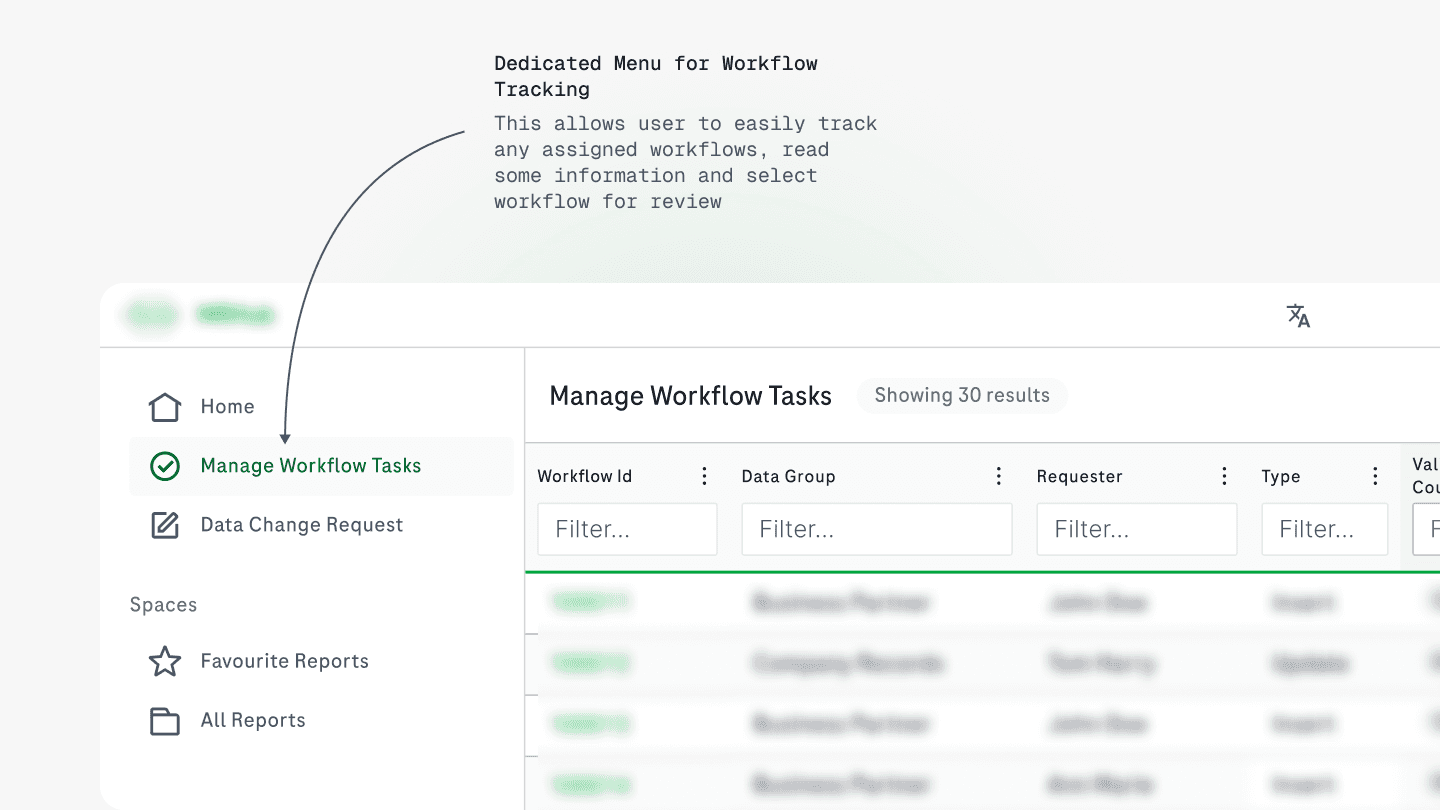
The redesigned reviewer flow addresses this through a dedicated Manage Review Tasks section. From here, reviewers see all assigned tasks in a single list — dataset, submitter name, type, completion count, and status, with enough context to triage before opening any individual item.
Field Update tab — current vs. new values side by side
Additional Information tab — reason for change, implementation date, supporting links
Approval Status tab — full chain of reviewers and their decisions
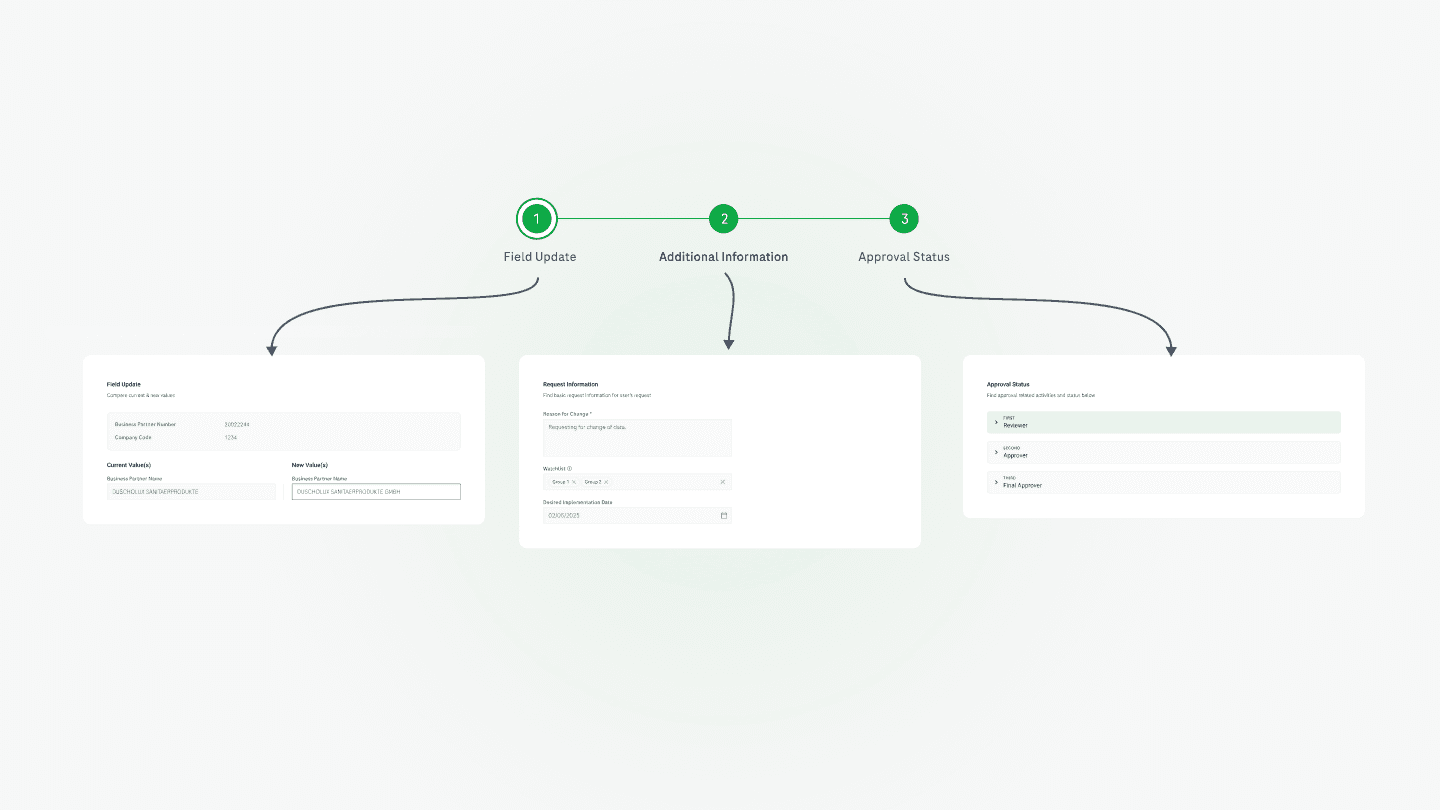
Key design decisions and rationale
The reviewer's task view shares the same layout structure as the requester's submission form. This was an intentional choice with two compounding benefits: it reduces the cognitive effort needed to interpret information. The user already knows where to look and it reduced development effort by reusing components rather than building a separate pattern from scratch.
Challenge 5 — Making Approval Routing Configuration Intuitive
The routing configuration system is the governance backbone of the platform. It determines which fields in a submitted request route to which reviewer groups — meaning if it's configured incorrectly, the entire approval chain breaks. Yet in the legacy system, this configuration was entirely manual, spread across disconnected interfaces, with no confirmation that the setup was valid.
The conceptual model: When a request is submitted, it is automatically split into separate review tasks based on which fields are being changed. Each task routes to a specific reviewer group. Administrators create and manage the routing templates that define this logic.
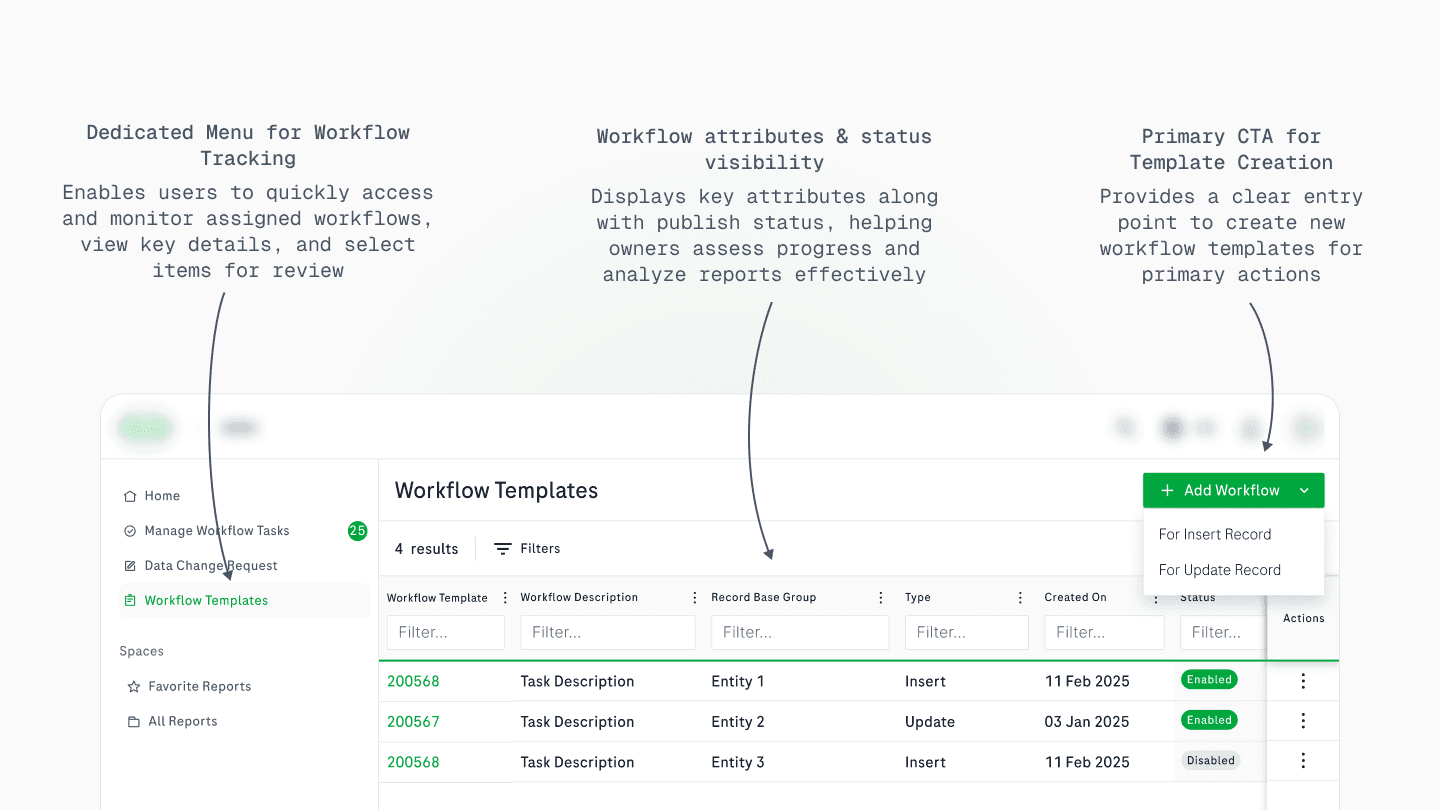
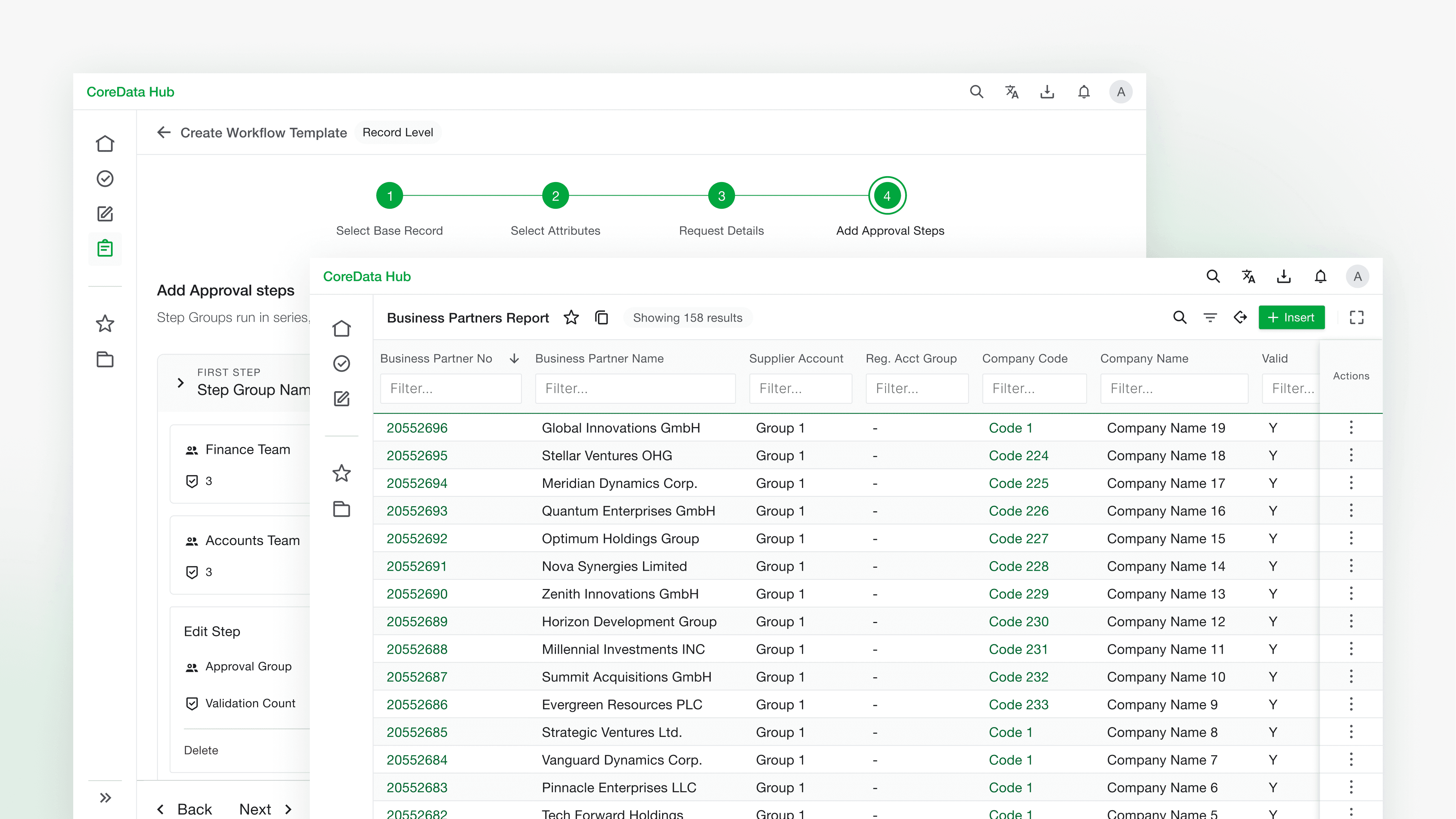
The default screen for workflow template was made with required attributes and primary action.
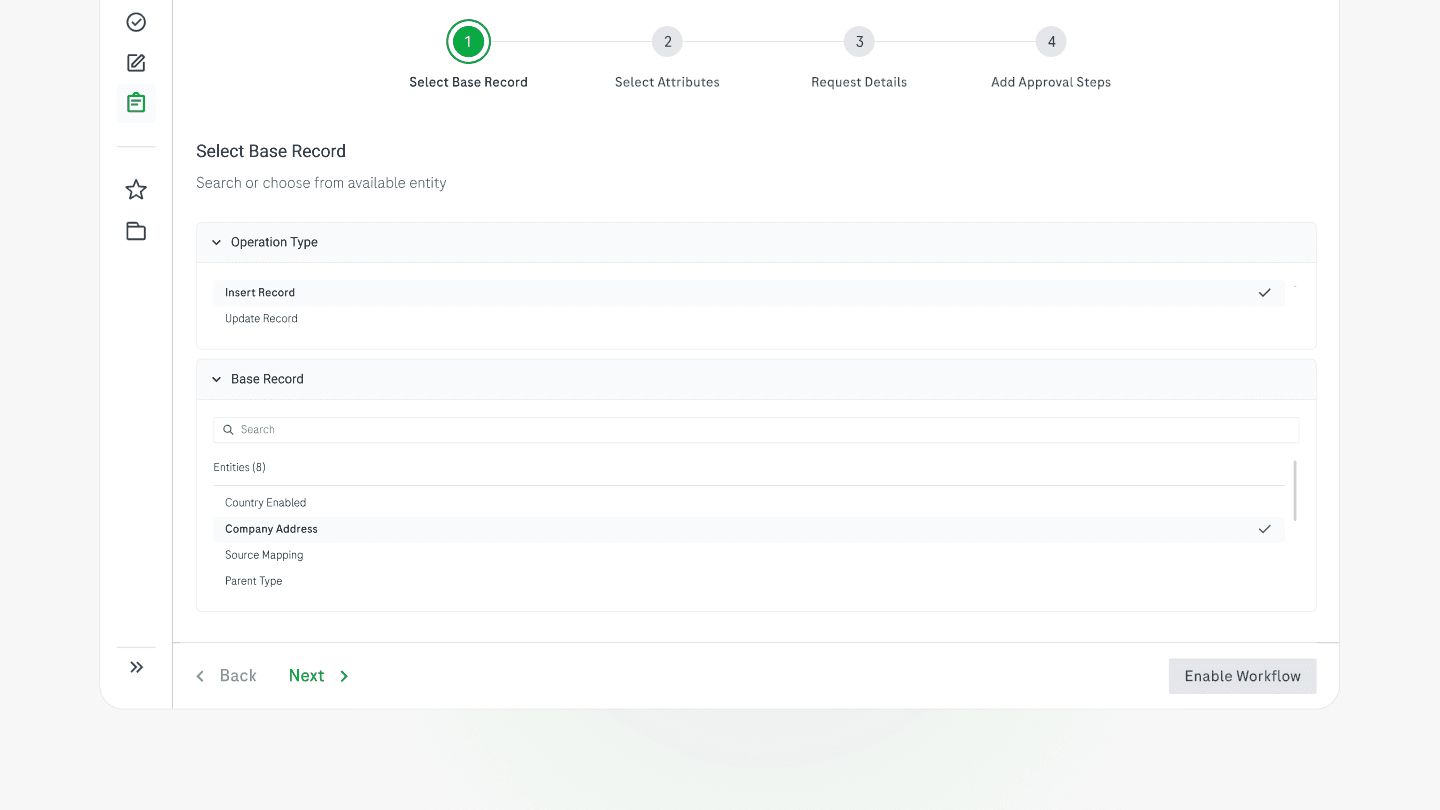
The 4 steps of adding workflow template
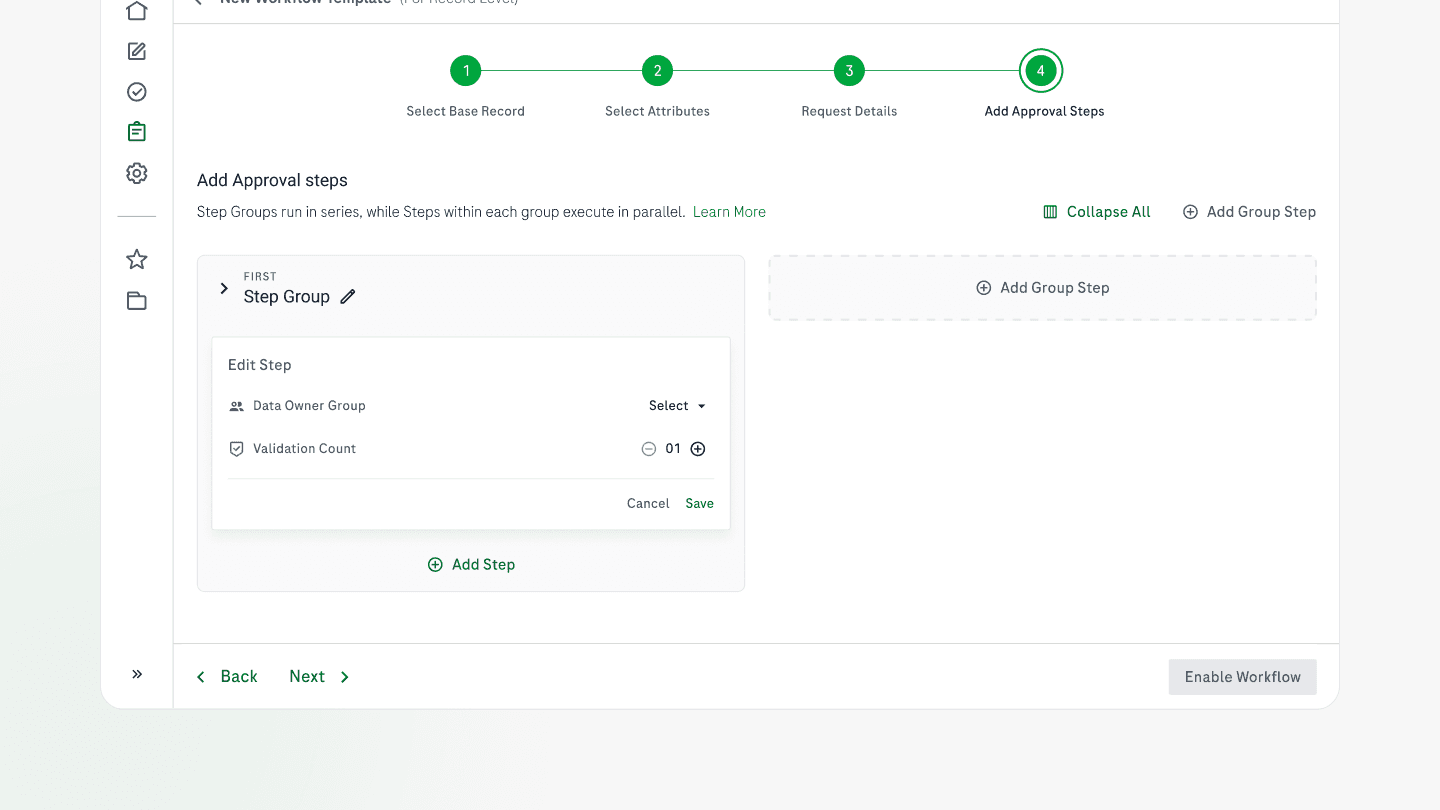
Adding Data Owners and Validation Count
Key design decisions and rationale
The template creation flow was designed around the mental model Administrators already had. They think sequentially:
what kind of operation? → which fields? → what are the supporting details? → who approves?
This became our four-step structure: Select Record Type → Select Fields → Request Details → Add Approval Steps.
12 USABILITY TESTING
Usability Testing: Findings and Iterations
We tested the first version of the form with 5 stakeholders. Three issues were surfaced and resolved before the final design:
No comparison between old and new value — resolved by introducing the current / new value side-by-side layout
No reserved space for primary record identifiers — resolved by adding a persistent identifier section in the header zone
No visual cue for edited fields.
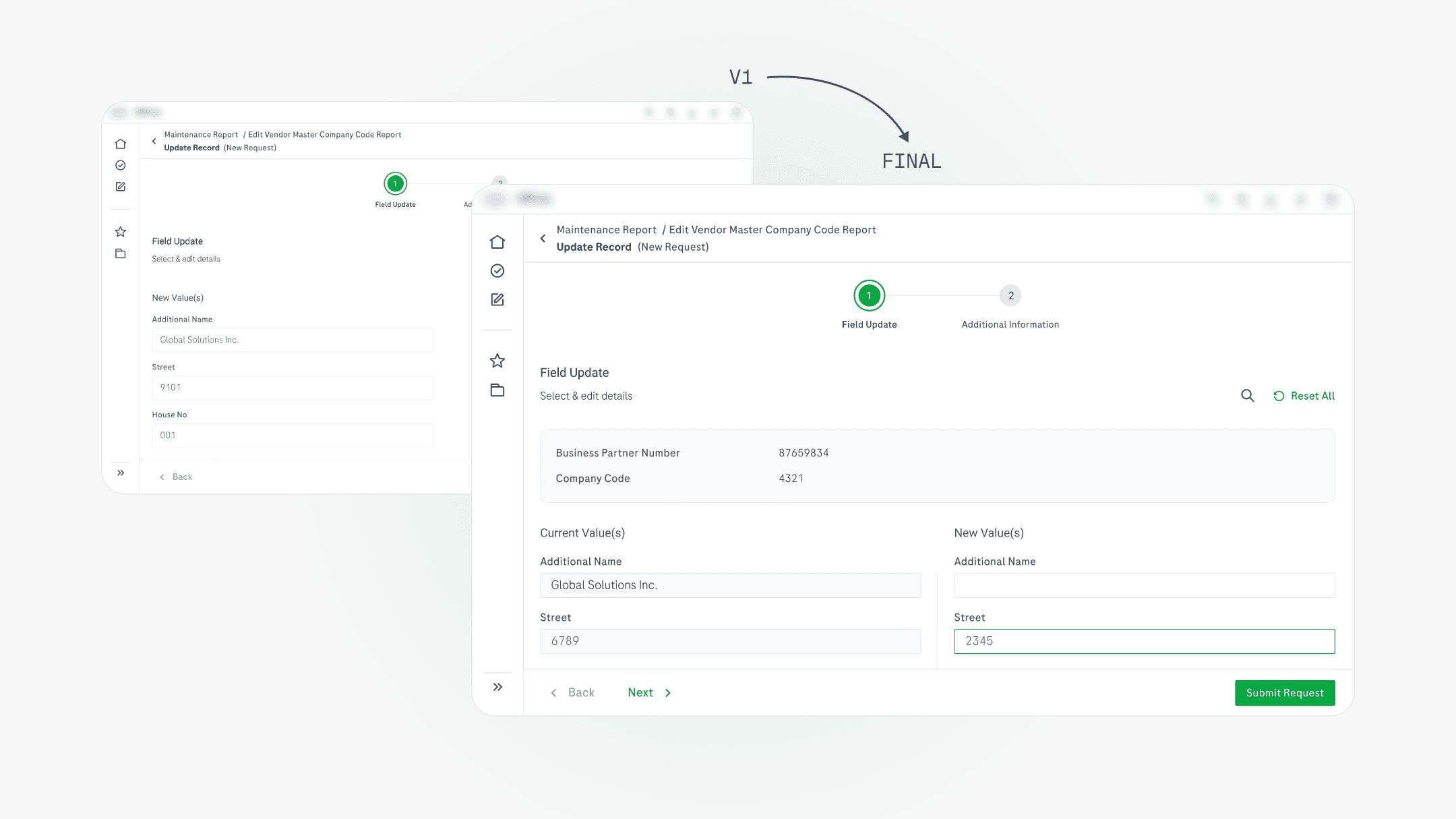
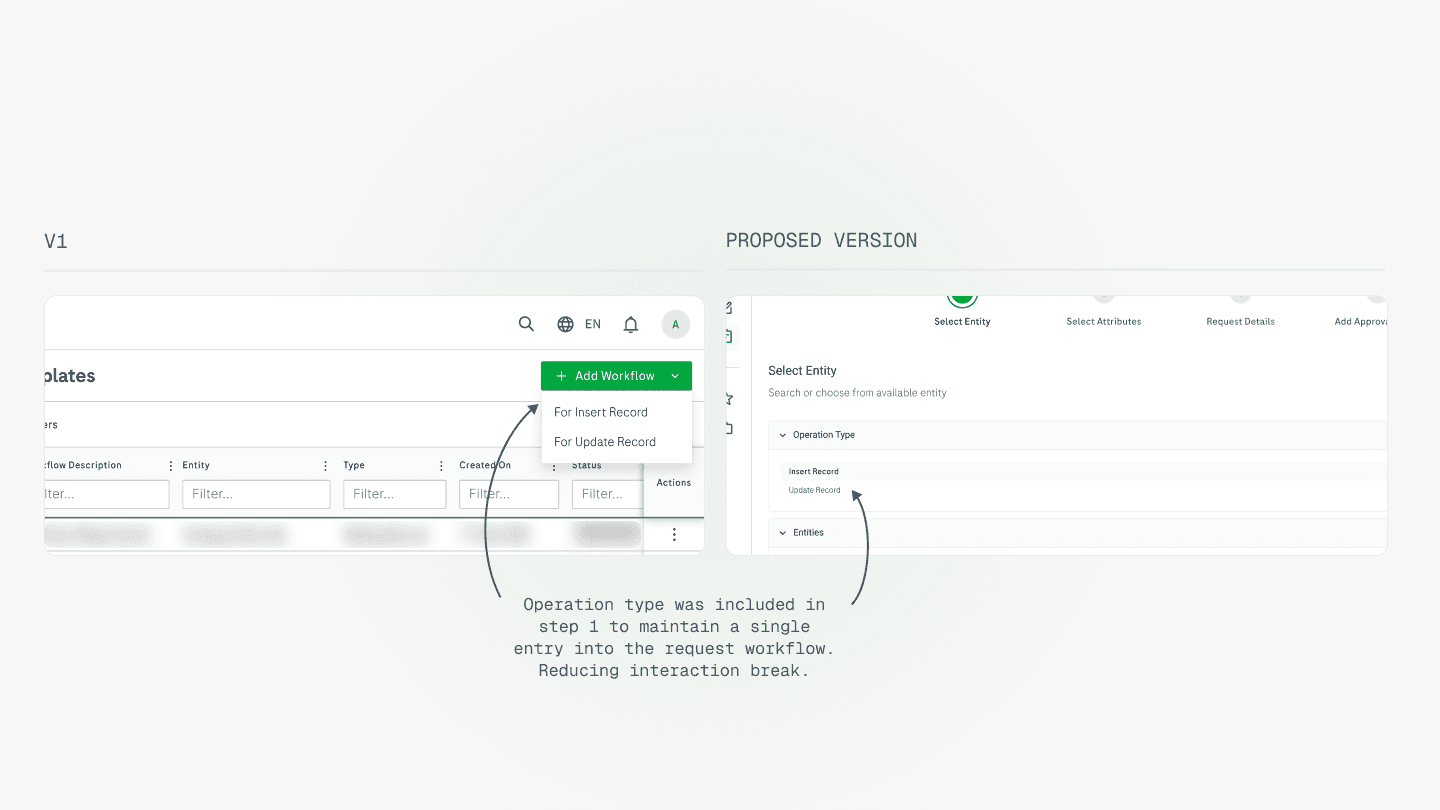
Operation type in Step 1, not as a separate entry point. An earlier version placed operation type selection outside the form, requiring users to choose before the form even opened. Testing revealed this created unnecessary friction between intent and action. Moving it into Step 1 consolidated the entry into a single, uninterrupted flow.
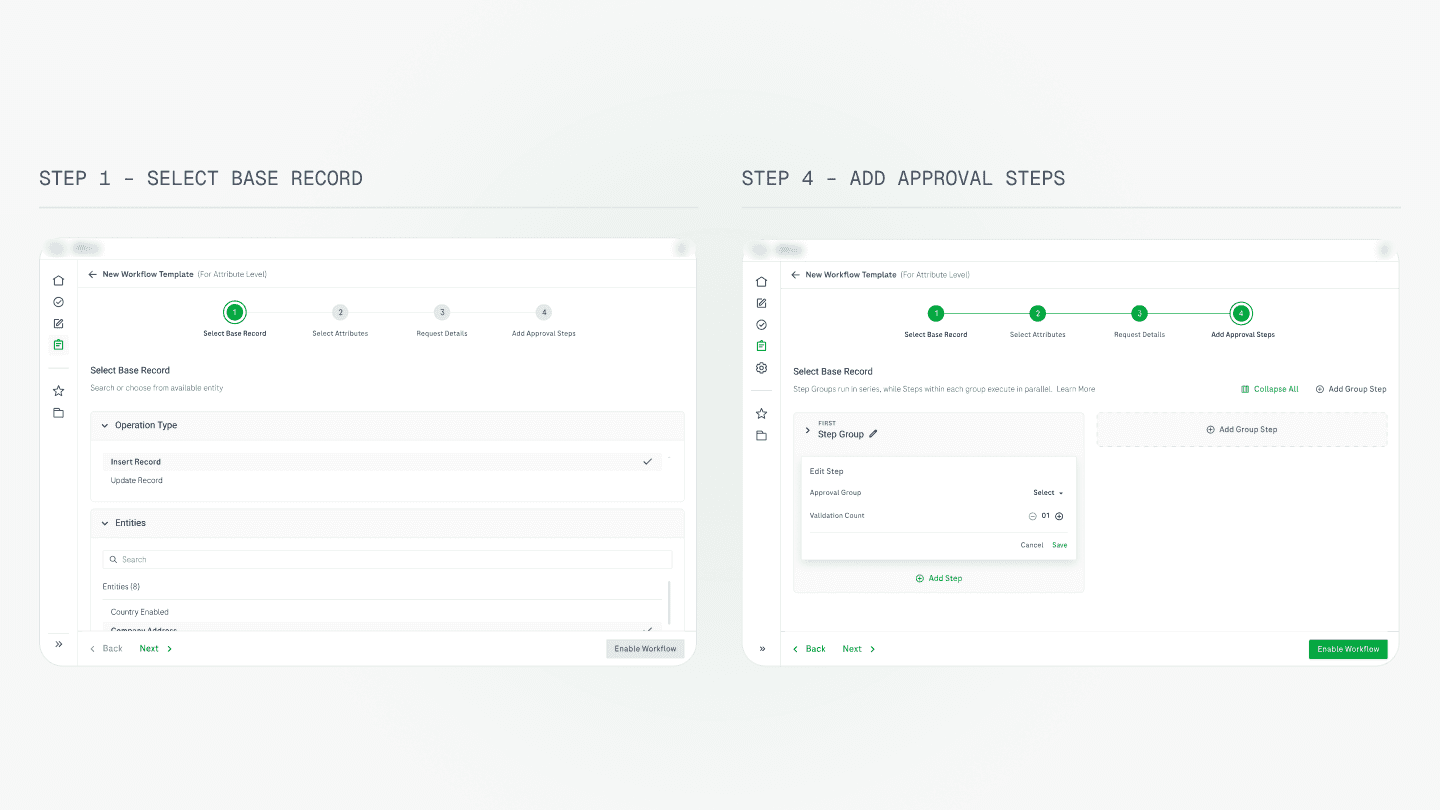
The approval chain design: from flat table to structured groups. The most complex design problem in the entire module was representing the approval chain — specifically, the logic that approval groups run sequentially, while reviewers within a group act in parallel.
The final design groups approval steps visually — each group is a distinct block with a clear label, an inline validation count editor, and an Add Reviewer action within the group. The sequential nature of groups is communicated through vertical stacking and numbered labelling; the parallel nature of reviewers within a group is communicated through horizontal placement. This directly matched the mental model surfaced in research, and was confirmed in testing with Administrators.
13 Outcome
Outcome & impact
The platform was in active development at the time of writing. The following outcomes are based on comparative task flow analysis, usability testing with 5 stakeholders, and structured evaluation against the legacy system.
Projected 40–60% reduction in interface switching
Request creation, review, and tracking consolidated into a single platform; legacy required navigation across 3+ separate interfaces per task
Based on comparative task flow analysis against legacy system
25–35% estimated reduction in submission time
Standardised form with a single entry point and step-based progression vs. multiple inconsistent entry points in the legacy flow
based on step-count comparison between legacy multi-entry and standadised single entry flows
Estimated reduction in approval delays
Central place to review the raised request along with standardised raised request view resulted in reduction in approval delays
Projected reduction in workflow routing configuration
Dedicated request tracking with colour-coded status and full approval chain visibility replaces zero visibility in the legacy system
14 What's Next
Reflection & what's next
Notification priortization:
3 months on a system of this complexity forces hard prioritisation calls. The decision to defer the broken notification fix was defensible. It had lower daily frequency than the core submission and review friction. But it remained the single most painful daily experience for reviewers. Given more time, I would have pushed harder to include at minimum a server-side deep-link fix in Phase 1, even if the broader notification redesign moved to Phase 2.
Approval routing configuration:
The approval routing configuration is the part of the system I'd most want to return to with more testing. Administrators use it infrequently — once or twice a month — which means errors in configuration can go undetected for extended periods before breaking the approval chain. The current design provides no validation feedback on whether a created template is logically complete. That's a meaningful gap I'd want to close with a completeness check or a preview of the routing logic before publishing.